5 Agent Skills That Run My Whole Coding Workflow
Grilling, PRDs, vertical slices, conditional TDD and a slim AGENTS.md. The five-skill pipeline I run on every feature, built on Matt Pocock's agent skills. →

Óscar Gallego
Web Developer
On this page
An AI agent is like having a really good dev sitting next to you. It reasons, it writes code, it spots patterns, sometimes it genuinely surprises you.
One problem: every morning it wakes up with no memory.
Nothing. Not yesterday’s feature, not why that component is the way it is, not the decision your team bled over six months ago. And if you don’t give it context? It invents the context. With terrifying confidence. That’s when the show starts.
So the trick isn’t “use AI to write code.” Everyone does that already. The trick is giving it a process. Repeatable. One that doesn’t depend on you being inspired at 5pm on a Tuesday. One that forces it to think before it starts touching files like it’s Friday afternoon in prod.
Matt Pocock framed this really cleanly with agent skills: small, named instructions you invoke when you want the agent to follow a specific path. I read his take, made it my own, and it turned into a pipeline I run on almost every feature.
To be clear: I don’t make up the skills or modify them. I use them exactly as they come. What’s mine is the flow: the order I invoke them in and how I chain them together. Some are Matt’s; others come from elsewhere. What I took from him is the underlying rule: don’t let the agent write code until it’s earned the right.
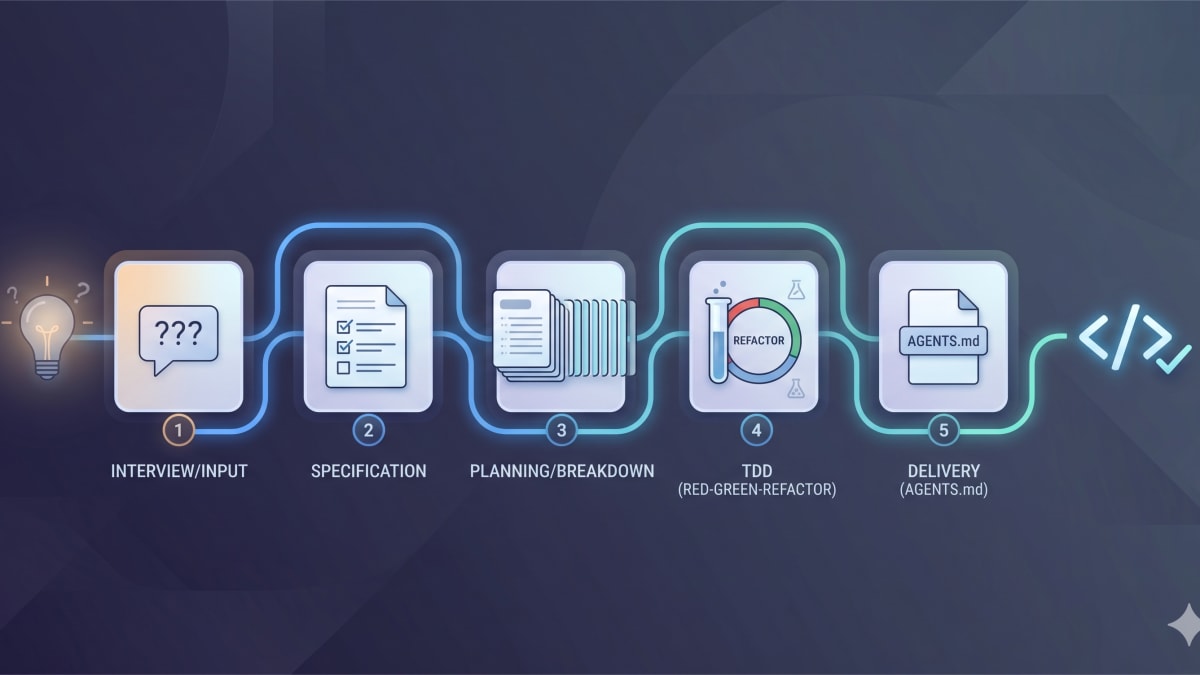
Five stages. Let’s go.
1. /grill-with-docs: pin the idea down before touching code
Every feature starts the same way: I’ve got a half-formed idea and, as much as it itches, I don’t let the agent write the plan yet.
Why? Because Claude Code’s default failure mode is getting hyped. You say “plan this” and it hands you a gorgeous plan (sections, bullets, a confidence that should scare you). The problem: it’s planning on assumptions. And an assumption is a bug with good grammar.
grill-with-docs flips it. Instead of planning, it interrogates me.
Asks. Goes one level deeper. Waits. Asks again. It doesn’t try to solve everything at once: it walks down the decision tree one branch at a time, the “design tree” Matt pulls from Fred Brooks’ The Design of Design. You keep descending the branches until you actually understand what you’re building before you write a line.
And the “with-docs” part isn’t decoration. If something can be answered by reading the code, it doesn’t ask me: it goes and looks. Opens components, reads conventions, checks existing types and APIs. If it can verify it, it doesn’t waste my time.
What I get out of this is gold:
- The whole picture first. Before deciding whether this is a hook, an endpoint, or a component, I understand the feature as a system.
- The uncomfortable questions. Empty states, errors, race conditions, permissions, what happens when two things fire at once. The stuff nobody thinks about until prod explains it to you with a screenshot at 3am.
- Scope, explicit. This is the part I care about most. Here I say: this is in, this is out, and this we’re leaving out on purpose. Not “we forgot.” Decided, written, closed.
Is it uncomfortable? Yeah. Good. If your idea can’t survive a few questions before you build it, wait until real users get their hands on it.
When the grilling ends, the idea isn’t a cloud anymore. It has edges.
2. /to-prd: turn the conversation into a doc on GitHub
After the grilling there’s finally something worth writing down. That’s where to-prd comes in.
The skill takes the whole conversation and turns it into a Product Requirements Document. But it doesn’t leave it to die in the chat: it files it straight as a GitHub Issue.
And that detail changes everything. The context stops living in a throwaway Claude session. Now it has a URL. It has history. It lives where the real work lives. I close the terminal, switch branches, open another conversation… and the decision is still there. It doesn’t evaporate.
The PRD revolves around user stories: what has to happen for the user, in plain language, not a list of files to touch. That matters more than it sounds. A good PRD doesn’t say “create this hook and this service.” It says what behavior you expect and which cases to cover. The how comes later.
Since the grilling already did the dirty work, this stage doesn’t reopen the debate. It just turns decisions into an artifact the next stage can chew on.
Less magic. More traceability.
3. /to-issues: cut the destination into a journey
A PRD tells you where you want to end up. It doesn’t tell you how to get there without crashing on the way.
Telling an agent “implement this whole PRD” is inviting it to move house with a single grocery bag. Might work out. But it’s not a plan.
to-issues takes the PRD and splits it into small GitHub issues. Each one understandable, runnable, and reviewable on its own.
The golden rule: vertical slices, not horizontal ones.
None of this:
- “build the data layer”
- “build the business logic”
- “build the UI”
Looks tidy, right? But it delivers NOTHING until you glue all three together. Meanwhile you’ve got three issues that do nothing on their own. That’s architecture on layaway.
A vertical slice does the opposite: it cuts through UI, logic, and data to deliver one small behavior working end to end. Maybe it’s not the whole feature. But it’s already something real, something you can touch.
This habit comes from working in a SAFe environment. And look, SAFe has its baggage. Let’s not kid ourselves, nobody wakes up thrilled about PI Planning. But one idea stuck with me for good: a story should be a small vertical slice of system behavior. Slice by value, not by technology. If you need three slices before anyone sees anything useful, you sliced it wrong.
(And no, this isn’t Scrum, even though people mix them up. SAFe sits above the teams: several teams form an Agile Release Train that syncs every 8 to 12 weeks. Down at the team, things run Scrum-style, with two-week iterations. The part I took is the stories.)
And with agents this matters even more. to-issues doesn’t just split the work: it defines dependencies. What blocks what. What you can grab right now. What can run in parallel.
That’s key if you want to turn loose several agents at once. A self-contained issue can be assigned without the agent having to understand half the universe. If two don’t step on each other, they move in parallel. And if they’re sliced well, reviewing the result hurts a lot less too.
The idea is related to tracer bullets: thin shots that go through every layer to surface, early, what you didn’t know you didn’t know. Because unknown unknowns don’t show up while you design the perfect layer in the abstract. They show up when something actually works.
4. Implement: conditional TDD, plus a nuclear quality pass
Now, yeah. Code. But not always the same way: it depends on the codebase.
New project? TDD from minute one.
On greenfield I use /tdd, Matt’s skill. Red, green, refactor. No drama.
Test first. Watch it fail. Then the minimum code to make it pass. Then clean up. And again, until the behavior is locked.
With agents this works beautifully because you give them a target. They’re no longer “implementing an idea”: they’re trying to pass a specific test. And that cuts way down on the urge to invent scope, build weird abstractions, or touch things nobody asked for. A red test is the clearest conversation in the world: this doesn’t work yet, fix it.
Big, inherited codebase? I don’t force TDD.
Here’s where I climb down off the pulpit. In a large legacy app, bolting TDD onto a half-built feature is more theater than engineering. The boundaries aren’t clear, the mocks are a jungle, the test harness looks like it was built by a lost civilization… and you end up fighting the infrastructure more than shipping value.
So on brownfield I implement more directly. But I don’t let it slide unchecked: that’s where /thermo-nuclear-code-quality-review comes in.
The name is ridiculous. It’s also pretty accurate.
It’s an aggressive quality pass over what was just written. It hunts for simplifications, duplication, weak names, code that looks like it works but smells off, uncovered cases, accidental complexity. It’s like asking the agent to stop being the author and become, for ten minutes, the most insufferable reviewer on the team.
And on legacy that pays off big. I can’t always build with TDD from the start, but I can force the result through a hard review before calling it done.
So my rule is: greenfield, TDD; brownfield, normal implementation + nuclear review. Not dogma. Engineering with context. The goal is the same: final code I’d put my name on in a PR without staring at the floor.
5. /setup-matt-pocock-skills: a tiny AGENTS.md and a CLAUDE.md that just points to it
The last skill doesn’t build features. It builds the environment so the other four work better.
setup-matt-pocock-skills installs the kit. But what I really care about is what I pair it with: a serious cleanup of the project instructions.
I used to have, in each project, a giant CLAUDE.md. The classic: you start with four useful rules, then a convention, then an exception, then “remember not to touch this,” then “when you work on tests, do that.” Three months later you’ve got a document that reads like the constitution of a country with too many microservices.
And the agent? It doesn’t read it well. It skims. It loses details. The important rules get buried under the noise.
The fix was to take the drama out of it.
Now the real instructions live in a deliberately small AGENTS.md, the standard several tools already understand, short enough that the agent actually reads all of it. And CLAUDE.md shrinks to almost a pointer: go read AGENTS.md.
One source of truth. Fewer tokens burned. Fewer contradictions. Less “but this was on some lost line of the giant doc.”
It’s a small change, but you feel it. Especially when you use agents every day. Instructions aren’t a landfill. They’re an interface.
The real point: process is the moat
None of this is rocket science.
You interrogate the idea. You document it. You cut it into small slices. You implement with discipline. You keep the instructions clean.
The powerful part isn’t any single skill. The powerful part is turning the way you work into something invokable. Repeatable. Boring, even. And in programming, “boring” is usually a compliment.
Because an agent can be incredibly capable, but it has no permanent context. No team memory. It doesn’t know why an old decision exists. It doesn’t remember the war that broke out around some component half a year ago. You do. Or you should.
So don’t treat it like an oracle. Treat it like a strong dev who joined the project this very morning and needs a process to avoid breaking things with confidence.
Give it a strict path and it produces genuinely good work. Let it loose and it’ll build you a generic abstraction for a problem it didn’t understand yet.
The core idea is Matt Pocock’s, and his skills repository is the best place to start. Don’t copy my pipeline. Honestly, better if you don’t: the interesting part is building your own. But make it explicit.
Because in the age of agents, your edge isn’t just writing code anymore. It’s designing the system that makes the code come out right more than once.
Related reading: these skills are most fun on a real project. Here’s how I built ga4-manager to automate Google Analytics, one of the codebases this pipeline runs on.
P.S. If you’ve built your own skill pipeline, I want to see it. What did you encode that I’m missing? Hit me up on Twitter/X.